Your lights and video,
running themselves.
Build the show in TraxxTool, on the same timeline as the song. ShowVizz plays it at the gig: it listens to the iPad that is already running your tracks, and drives your DMX rig and the screen behind you. No lighting console, and nobody at the back on a laptop.
Free·never sold·Windows, Mac, Linux, iPad, iPhone and Android
Four steps, and none of them are a lighting course
You already know how to put a marker on a timeline. That is the only skill this needs.
Key in your rig
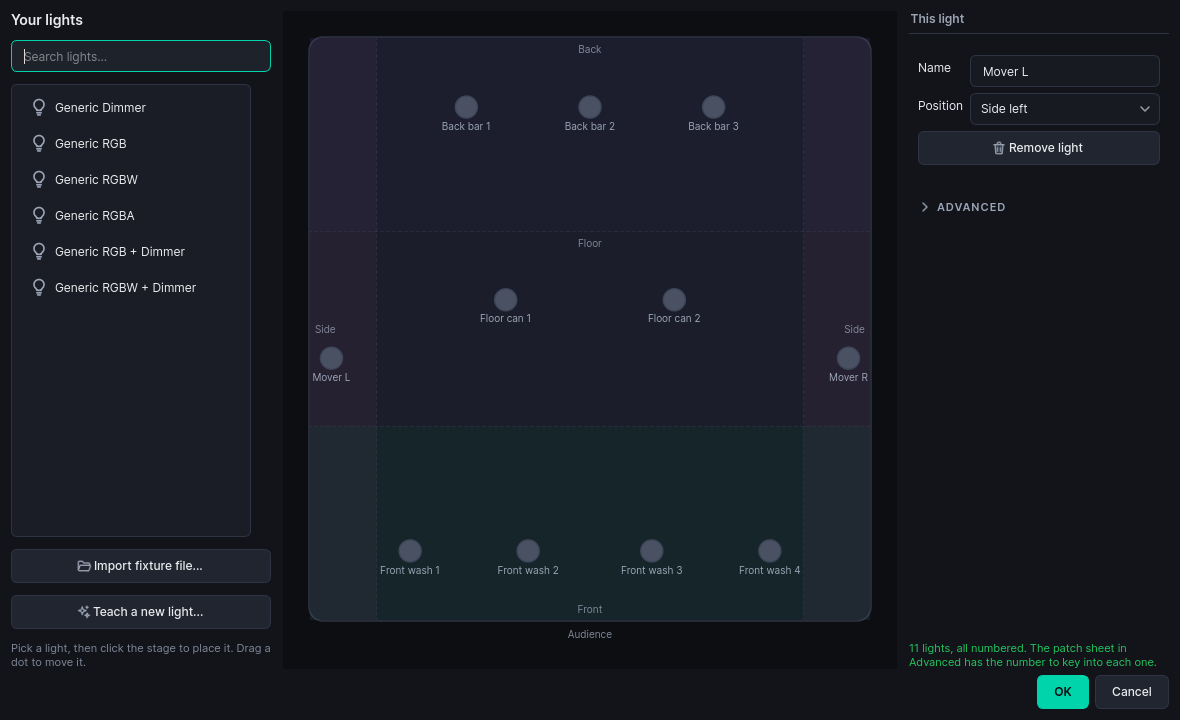
Drag your lights onto a stage plan. TraxxTool numbers them, prints the patch sheet, and works out the groups so you never think in channels.
freeLet it draft the show
Pick a style. It writes the cues off the song's own sections, energy and beat grid, so you start with a show rather than an empty timeline.
freePolish it where you always do
A lighting lane under your section markers, a look palette above it. Pick a look, paint a clip, drag the fades.
freeCopy it to the show machine
One folder, with the cue triggers written into the song's own MIDI. That is the last time you think about any of it.
ProTen minutes, and it knows your stage
Drag each light onto the plan roughly where it hangs. That is the whole setup. Front, back, floor and sides are worked out from where you dropped them, and every cue after this talks about the front wash instead of channel 17.
- It picks the numbers. You get a list saying what to set on each light's own display
- Never seen your fixture? Import a QLC+ or GDTF profile, or teach it by wiggling the real channels
- There is no lighting desk anywhere in this. Your lights answer to the machine that runs your show
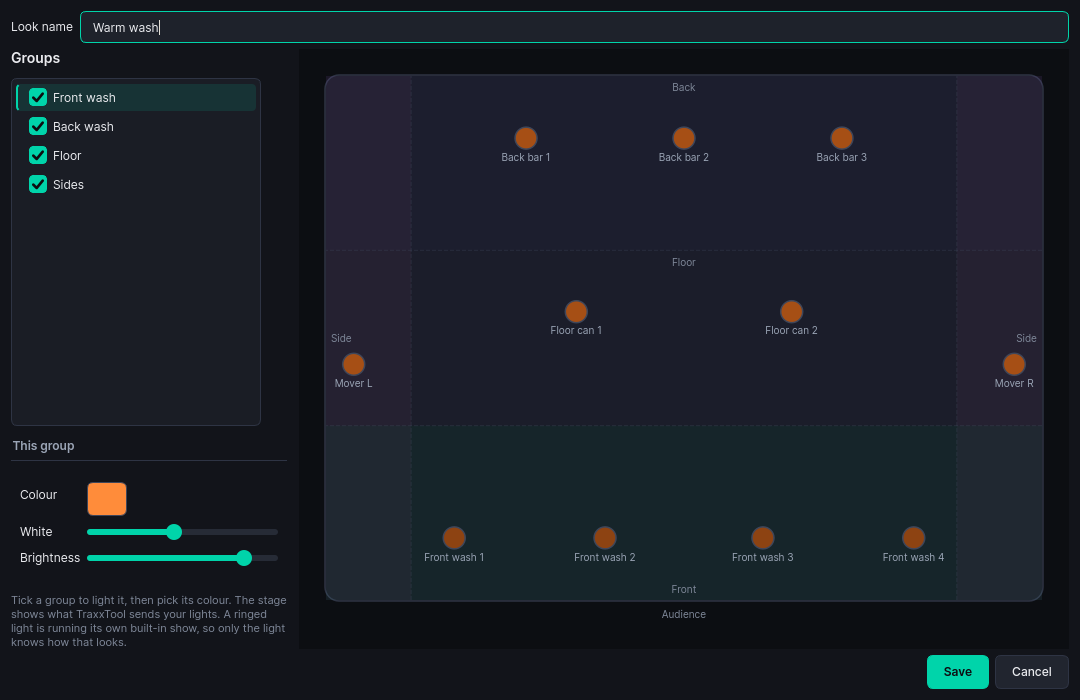
Tick a group, pick a colour
A look is a picture of the stage: who is lit, what colour, how bright. Build the six or seven your band uses and every song draws from the same set, so the blue you like is the same blue all night.
- The stage plan shows what TraxxTool will send, before anything is plugged in
- Six starter looks are invented from your own rig
- A light running its own built-in program is ringed, because only that light knows how it looks
It writes the show, you make it yours
Pick one of five styles: classic band, rock show, ballad, party or worship. The chorus comes out brighter than the verse because it measured them. Every song is seeded from itself, so two songs in the same style do not come out as the same show.
- 21 effects locked to the beat grid, so a chase lands on the beat rather than near it
- Movers hold their aim through a fade instead of drooping with the intensity
- No moving lights in your rig? It says so, and plays the sweeps as level changes instead
Your video, cued to the chorus
The screen behind you runs off the same timeline as the lights. A film that plays with the song, clips that come in for the chorus, a splash that holds the wall between numbers, and your logo over the top of all of it.
- Point a cue at a camera instead of a file and the wide shot becomes another layer, with the same fades
- The show asks for "wide", and tonight's band profile decides which camera that is
- The duo and the five-piece play the same show with their own footage, with nothing re-exported
- Overlays can key a flat colour out of any video, so a logo does not arrive in a black box
- TraxxTool converts your video when it compiles
Open it, and leave it alone
That is the whole operating procedure.
It follows the iPad
Stage Traxx already sends MIDI when you pick a song. ShowVizz loads that song's show and fires its cues. Start a song halfway through and the lights catch up to where they should be.
It stays out of the way of your gear
The cues ride in the song's own MIDI file, alongside your pedal and mixer commands, on their own channel.
There is nothing to press
A status screen: the song, the show time, the next cue, and a panic button. No cue stack to learn and nothing to program at the venue.
It runs without a rig
Art-Net or sACN over the network, or a USB DMX dongle. With nothing plugged in at all it still plays the show, so you can prove a set works at the kitchen table.
One missing file is one missing clip
It carries on with everything else rather than stopping the show. On quit it blacks the rig out before it lets go.
It can run from a folder
The .zip build needs no installer and no administrator rights, which matters when the laptop belongs to the venue. A USB stick is a fine home for it.
Download ShowVizz
The laptop, mini PC or tablet that plays the show. Install it once, copy your show across, and after that it is just a thing you switch on.
Windows
Windows 10 / 11 · 64-bit
macOS
Apple Silicon or Intel
Not sure? Apple menu, About This Mac: "Chip" means Apple Silicon, "Processor" means Intel.
Linux
x86-64
iPad and iPhone
From the App Store

Android
Phones and tablets
The APK is for installing without Google Play.
Verify your download (SHA-256)
Windows: 11f0840593ded4beb2381db93e7321119db33758f583b2d27a95e50b0349d001
Windows .zip: fe86cec4b0877be9228171aec3ae88d8096bf2625dfe57347aefe3f7a28b52ba
macOS Apple Silicon: 6570db4da9671f1ffc1965917a3467cd1cad582caa79384ed95de482be01f767
macOS Apple Silicon .zip: 643830744fa60040104630548fb2ba108c13e961d66c7a6d4ebae66b249d1948
macOS Intel: 5a3a79d31af8e3523c4fdb31bbd070a048d88f23dd7d6465daab5f9c670b2d0b
macOS Intel .zip: c8ec5193047cfc5d5bc37e3e64fb447f9486d7221a7d87039eceaa2485180e96
Linux: 67a90be4e4874161f6287fad0d6324f75f26c3da7526b019f79fbb6f0c17736b
Android APK: af7ad028e7314ce9f78c91454cf6352ddfcd6d0e22e8d3550e2675fc206c569e
iOS relink kit: ea9df5f564ba100a455eec3cdd2f03a4235059d165b578ffe21346265afca6ea
iOS relink kit (LGPL), 6 MB · Licences
What's new in 1.4.0
Added
- Stage Apps: interactive pages on the wall. This is a beta, on Windows only, and it comes with a warning. A show built in TraxxTool can now carry a Stage App: a showdown card, a running score, a now playing screen, an audience vote with a QR on the wall. Pages change from the song's own cues, at the end of a song, between songs, or by hand. It is the newest thing in ShowVizz and it has not played a real gig yet, so the App panel and the Remote screen say so. Rehearse a show with one before you run it for an audience.
- Which players draw a page, said plainly. Only the Windows desktop player draws Stage App pages. The macOS and Linux players run a show that carries one exactly as they run any other show, and say the web engine is not available on this machine. The iPad and Android players do not draw pages at all yet: the show runs, the lights and the video are untouched, and the page simply is not there. A show with a Stage App is safe to open on every platform; it is only Windows that puts the page on the wall.
- The page is an optional download. The web engine that draws it is a separate 150 MB pack for Windows, not part of the installer. A show without a Stage App never needs it, and a player without it runs a show that has one exactly as it runs any other: one line in the log, the lights and the video untouched.
- Drive it from a phone, with no internet. The player serves its own remote over the local network whenever a show with a Stage App is loaded. Pair a phone by pointing its camera at the QR on the Tonight screen, or type a six digit PIN. Devices are named and can be revoked, and there is a read-only view for the band. The remote now draws the app's own buttons: the pages by their titles, the app's own controls, and the vote the app declares.
- Audience voting from the cloud is new and has never been used at a venue. The QR on the wall, the vote page and the running tally work between the player and the server in testing, and no gig has ever run one. Treat the first night you use it as a rehearsal, and have the show work without it.
- Drive it from a MIDI controller. Notes, CCs and program changes on a control channel of their own, which the band's own pedalboard can never reach. Learn them on the Tonight screen.
- Back to splash always works. It fades the page's layer on the wall rather than asking the page to do anything, so it works with the engine dead, the network gone and the server on the floor.
Fixed
- The Lights tile says when the computer is not letting the light out. It used to read Going out while macOS or a firewall was blocking Art-Net. On a Mac it names the switch to turn on: System Settings > Privacy & Security > Local Network.
- When a Mac asks whether ShowVizz may use the local network, it now says what for.
Already running TraxxTool?
It can hand you the player instead. TraxxTool knows which show format it writes, checks that against the published player, and gives you the build that opens your shows, so there is no wrong one to pick.
The player is free. Building rigs, looks, effects, drafted shows and overlays is free too, and so is previewing the lot on the stage plan. Pro is what compiles the finished show for the stage.
Your set already has the timing in it
Every section marker you have placed is a lighting cue waiting to happen. Start with one song and see what it drafts.