Stems go in.
A gig comes out.
TraxxTool is the desktop workbench for a band that runs backing tracks. It does the tedious half: splitting stems, building the click and the count-in, syncing lyrics, placing the spoken cues, wiring up the pedals and the mixer. Then it exports into your Stage Traxx library, a stem pack, or your DAW, and pulls songs back out when you want to change one. The full toolkit is free. Built by a working musician who got tired of doing all of it by hand.
Windows, macOS & Linux·English and Spanish·no account needed to build
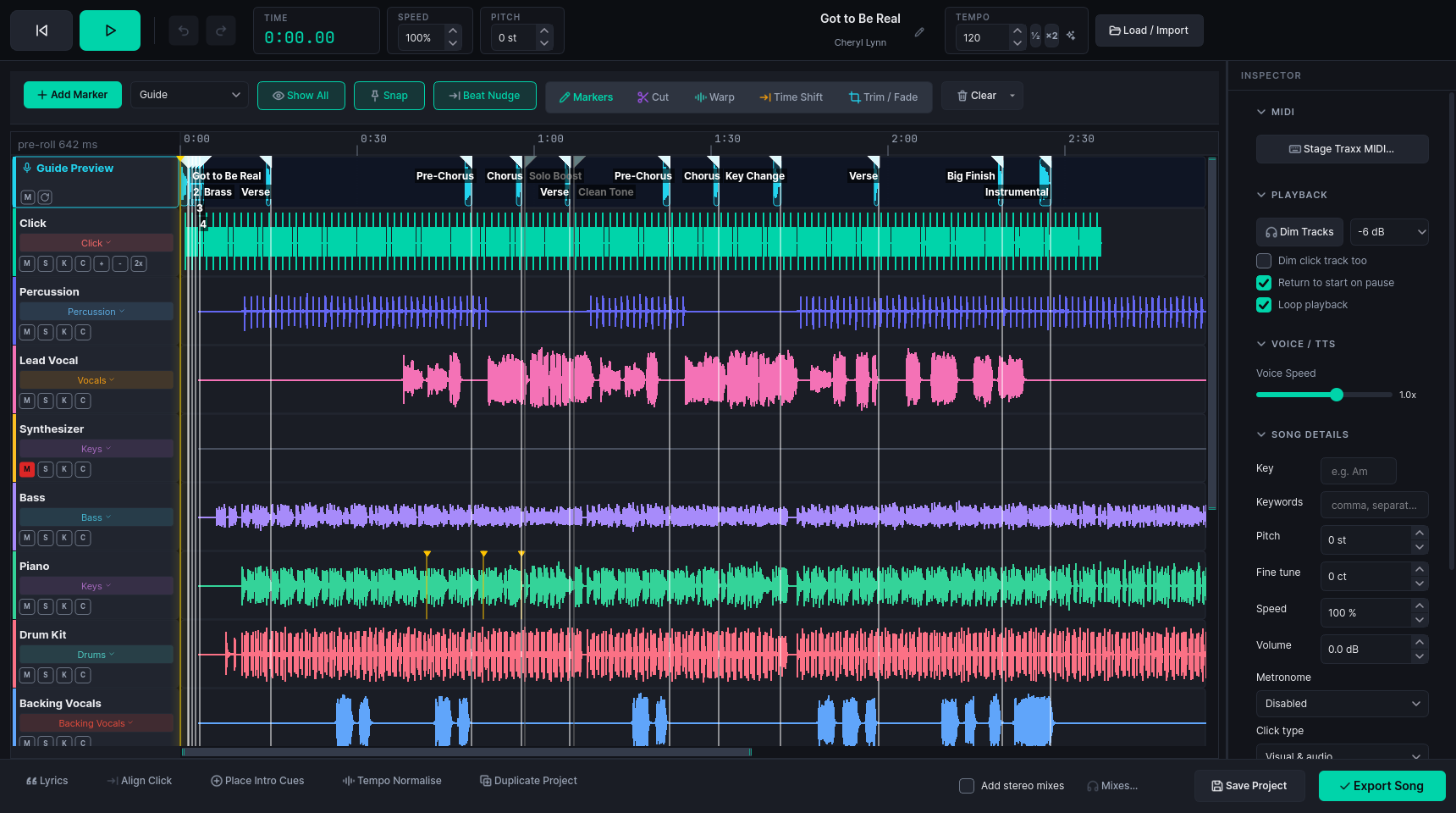
A song, start to stage
You've done this the long way: line everything up in a DAW, bounce, re-import, notice the click drifts, and start over. Here is the short way.
Drop a song in
A folder of stems, a single mp3, or the individual stems you already own from a backing-track provider or Google Drive. Only have the full mix? TraxxTool splits it into six stems right on your machine.
freeThe boring bits happen
Stems get end-aligned. The click and count-in are generated, the tempo detected, the title and artist worked out, the tracks named and routed. Lyrics are found and synced to the actual vocal.
Make it yours
Cut the four-minute outro. Warp the bar the drummer rushed. Drop spoken guide cues, pedal changes, lighting and mixer moves exactly where you want them.
Send it to the stage
Export a Song Share file, or merge a whole setlist into your existing Stage Traxx library, buses, EQ, MIDI and all. Changed your mind next week? Pull the song back out of the backup and send it again.
Bring what you already play
Not everyone starts from stems. Three ways people arrive, and what happens to each.
An existing Stage Traxx library
Point Import from Backup at your backup and pick the songs. A song that is one stereo file comes in as a Mix, a click on one side is found and offered for separation, and the whole batch can be split into stems in one go. Send it back with Stage Traxx 4 export, or Stage Traxx 3 export if you have not upgraded.
ProA folder of finished tracks
Add the folder in the Downloader and it lists one song per file. Add to Library asks once for the batch: split into stems, separate the click side only, or open as one track and split later. Add Click reads the beat from the mix and places a click that follows it, count-in included.
A click-left, band-right rig
TraxxTool finds the click side, separates it, and takes the song's tempo from that click. Going the other way, the Left/right backing track export puts click and cues on one side and the band on the other, and Stereo backing track writes one full-stereo file per song with lyric sidecars.
A twelve-minute medley, in an afternoon
Pick songs from your library. TraxxTool works out an order, a tempo for every join, a key plan that keeps the whole thing singable, and a crossfade on every track. Then it hands you one project with stems, click, lyrics and markers, and it exports like any other song.
- Play it and edit it while it plays: tempo, key, levels, crossfades and lane mutes all move under your hands
- Bars and beats, never milliseconds. Every join is anchored to a downbeat measured off the real audio
- A ballad in a run of up-tempo songs goes to half time rather than being stretched to breaking
- Trim and seam editors with waveforms, for any join you would rather do by hand
- The plan is saved beside the render, so you can reopen and change it later
Building, playing and editing a medley is free at any length. Sending one of more than three songs to the Workbench needs Pro.
Lyrics that land on the beat
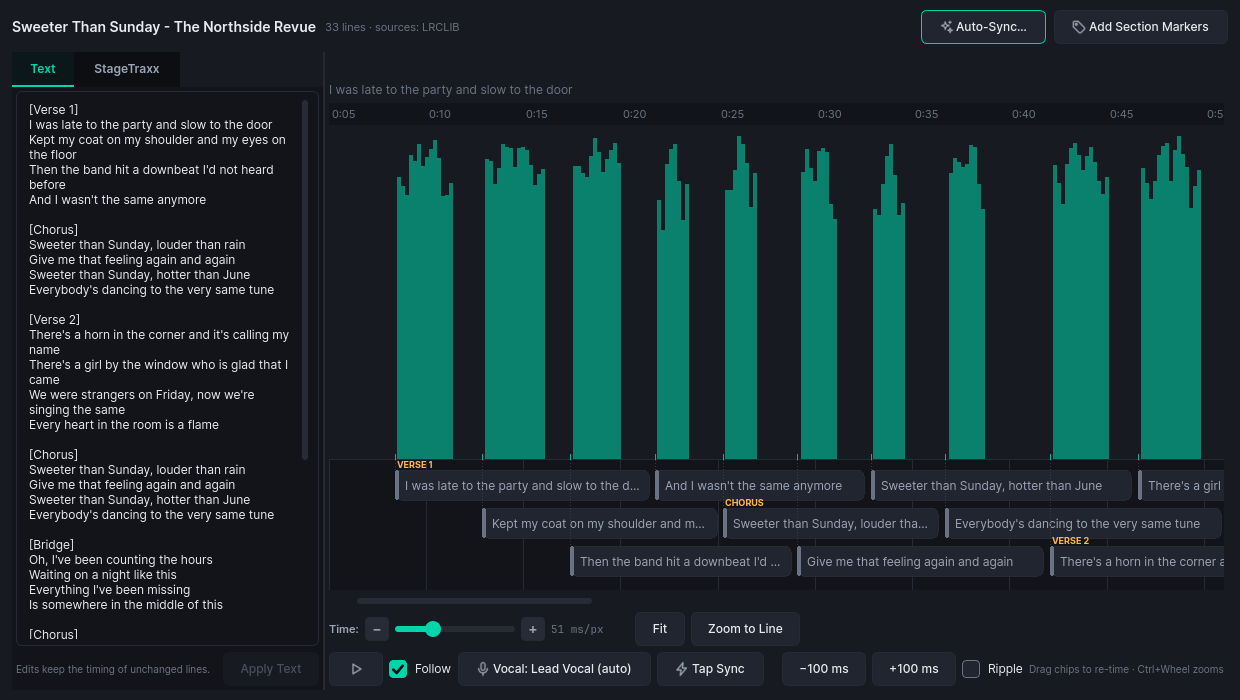
A room of its own for lyrics. Type or paste the words, pull them in from LRCLIB, or have them transcribed against the real vocal stem. Then drag each line along the vocal-activity ribbon until the timing sits right where the singer breathes. You see it exactly as Stage Traxx will render it on the iPad.
- A vocal-activity ribbon, so you place lines against real singing
- Live Stage Traxx preview of the timed
.lrc - Auto-sync, tap-sync, or nudge by 100 ms, whatever fits the song
- Exports drop
.txtand.lrcsidecars next to the stems
The other half of what goes in your ears
A click keeps time. It never says the chorus is coming, or who takes the solo. Spoken cues sit on the bars of the song you are already preparing, and come out as their own stem.

Your voice, or one you pick
Record each call once and it is yours in every song, for nothing. Or choose a studio voice and hear it before you commit to it.
freeOn the beat, not near it
Section calls are placed so the word finishes on the downbeat, and counts land the band on it. Both read the click's real beats, not a tempo you typed.
Out to the packs only
Cues export as their own stem, on their own bus if you want one, so the band hears the calls and the room never does.
Section cues come straight off the arrangement you already marked up. How guide tracks work →
Everything you'll stop doing by hand
Anything marked free never costs a penny. The occasional credits feature is optional and priced per job.
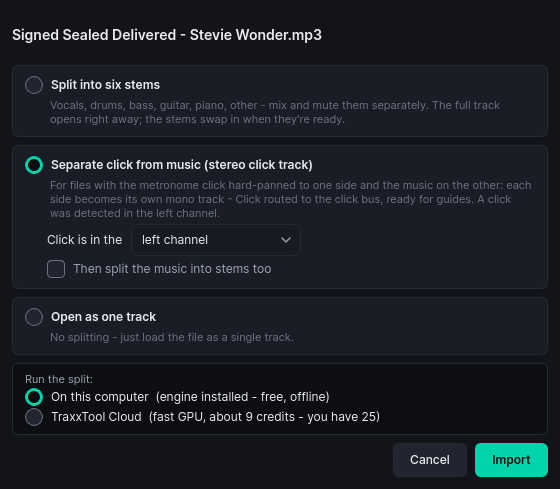
Only got the full mix? TraxxTool splits it into vocals, drums, bass, guitar, piano and everything else, locally, offline and free. It also spots a hard-panned click track and breaks it out onto its own bus. In a hurry, the cloud GPU does the same job for a few credits, and tells you the price before you say yes.
free on your machine
No click on the track you bought? TraxxTool synthesises one that matches, end-aligns it, and can fit it to the tempo grid. It works out the song's BPM and uses it everywhere: the click, the count-in, and the DAW export. When the source recording drifts, the warp tool bends the song onto the grid instead of the other way round.
free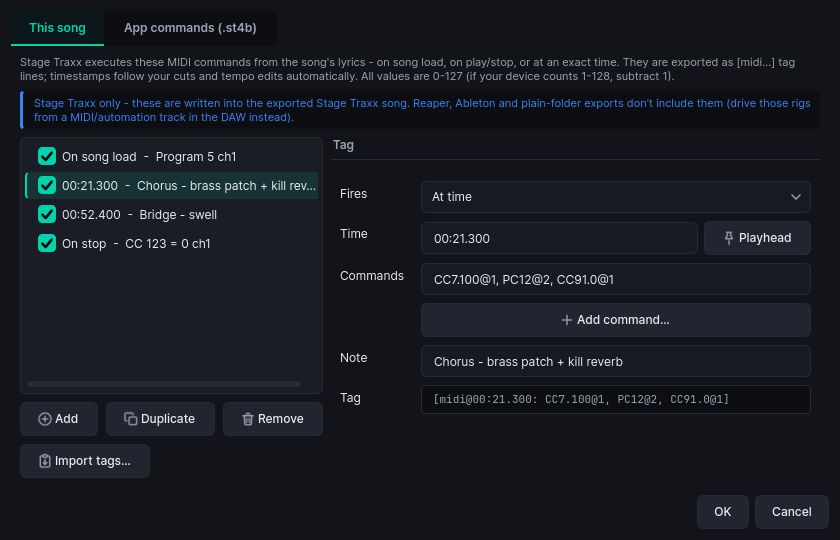
Patch changes on song load, a CC to kill the reverb at 1:23, pedal switches per section, mixer scenes over MIDI. Each one sits on the timeline like any other marker, so it survives your cuts and warps and lands in the export. One marker can fire several commands at once. Device profiles cover X Air mixers and HeadRush boards out of the box.
free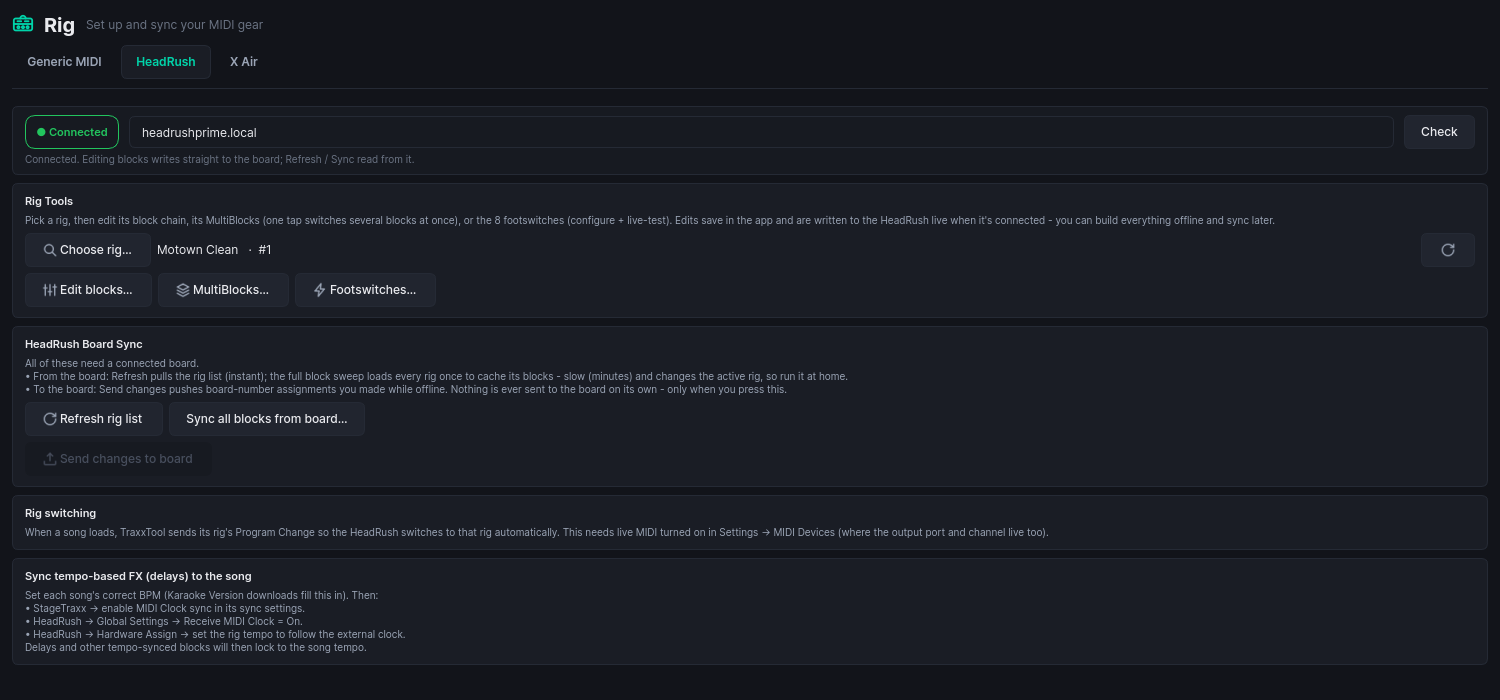
Your gear gets its own room. HeadRush, Kemper, Quad Cortex, Helix, the Fender Tone Master Pro, Nord Stage, the Roland FANTOM-0 and SPD-SX PRO, X Air, X32, Allen & Heath and more, each with a connection banner so you always know whether you are editing live or offline. Build rigs, MultiBlocks and footswitch layouts at home, then sync them to the board when it is on the network. All twenty-five are free, permanently. Lights and video run on stage through ShowVizz, our free stage player.
free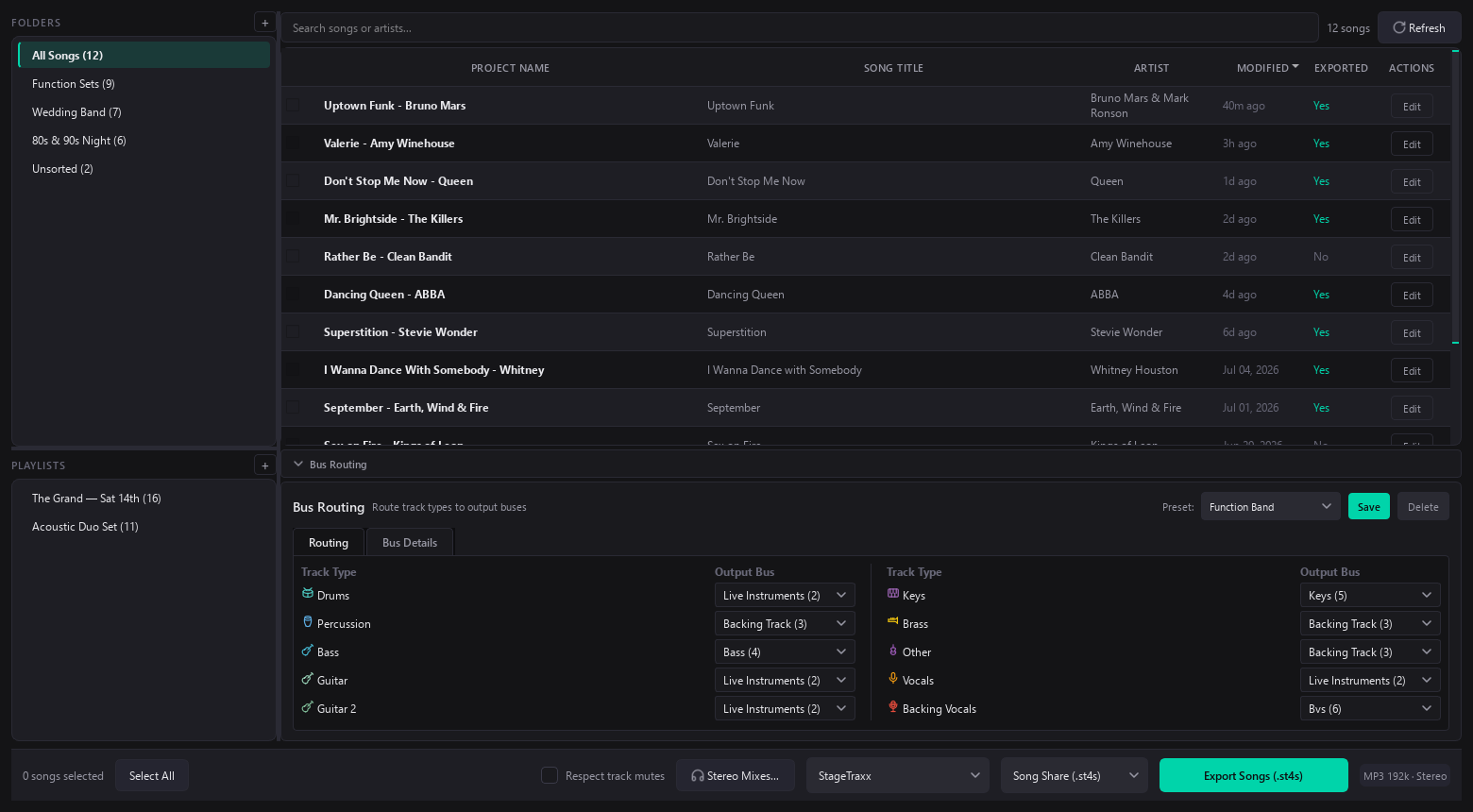
Point Import from Backup at any .st4b or .st4s and pick the songs you want. Each one arrives as a full project: stems, mixer settings, EQ, regions and their colours, synced lyrics, keywords, every song detail. Fix what you came to fix and export it back. Or turn on Live Edit, open a song from inside the backup, and write it straight back over its old version when you exit, leaving everything else in there untouched.
Every song project in one place, with folders, playlists and search that keeps up. Point it at a folder of finished tracks and every one comes in as a song. Paste the set list your band already has and it becomes a playlist. Then pick thirty songs, pick a format (Song Share, Full Backup, Stage Traxx 3, Reaper, Ableton, Logic Pro, or plain stems) and export the lot in one go.
free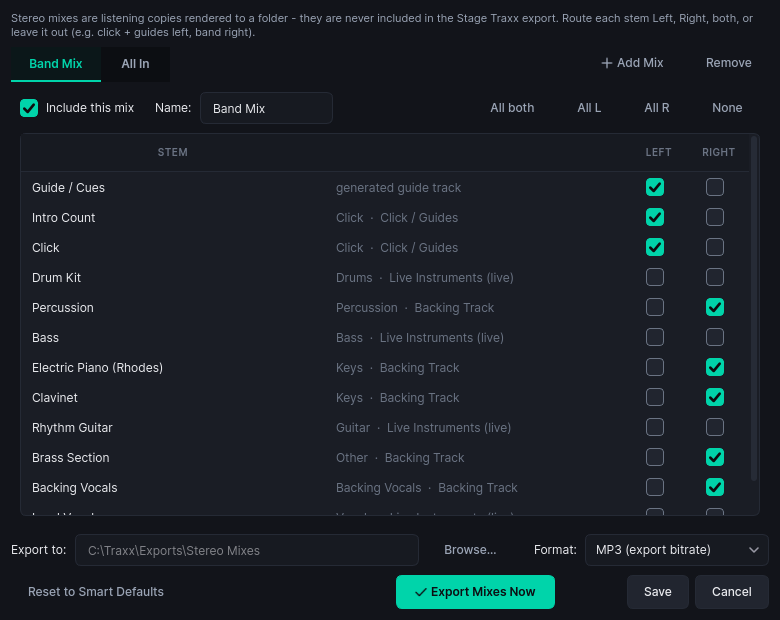
The drummer wants click-left, band-right. The singer wants no vocal. Everyone wants it yesterday. Stereo folder mixes render any per-stem left/right combination for the whole setlist at once. Rehearsal homework, sorted.
free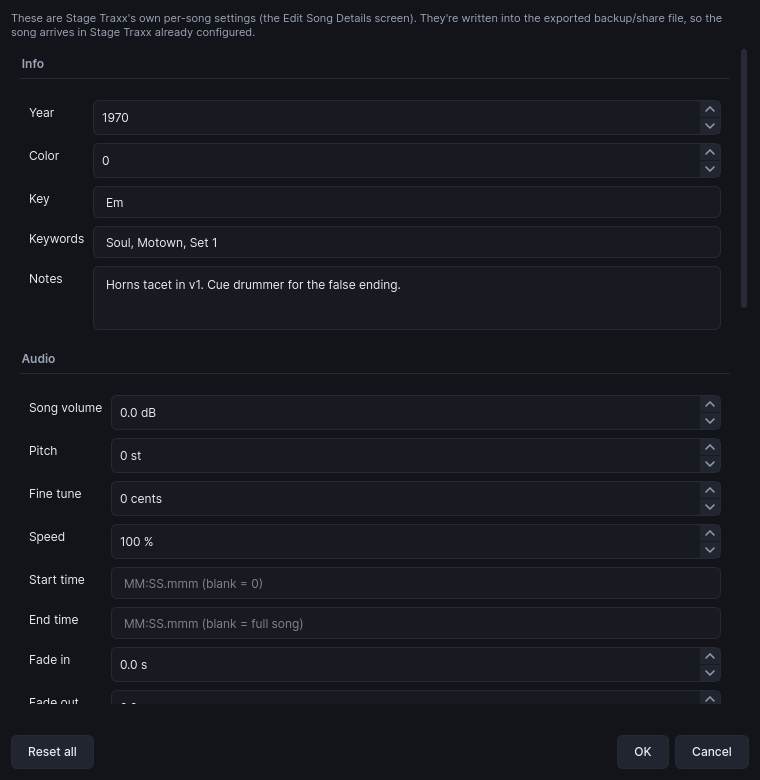
Key, keywords, MIDI trigger, pitch, speed, trims, fades, per-track names and levels. You edit them here, and they are written straight into the .st4s or .st4b your iPad imports. What you set is what the stage gets, with no post-import fiddling.
The lights and the screen, from the same timeline
Your section markers already know where the chorus is. Lighting Studio turns them into a light and video show, and a free stage player runs it at the gig.
ShowVizz runs on Windows, Mac and Linux. The player is free and always will be. See how the whole thing works →
Don't arrange the same song twice
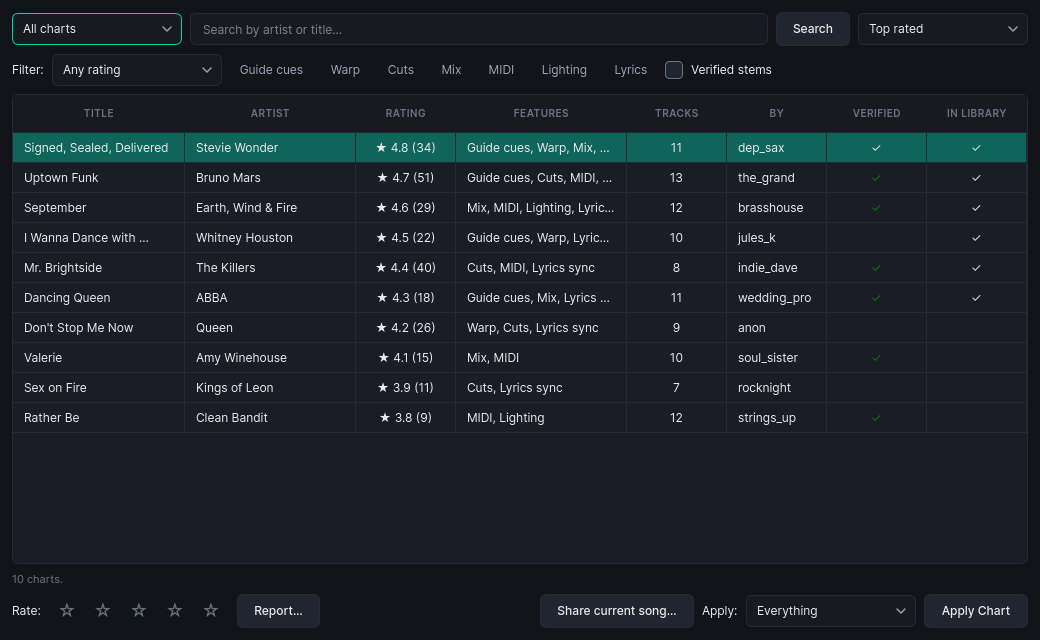
Someone in the community has probably already lined up the song you are about to. A community chart shares the arrangement: markers, cuts, warps, MIDI, mixes and guide cues. It never shares the audio. Each chart is fingerprinted against the stems it was built from, so a download either matches your files exactly or tells you plainly that it does not.
- Rated and browsable, with badges for what each chart carries
- Verified marks for charts built on unmodified original stems
- Apply everything, or just the parts you want, onto your own audio
- Never carries lyric text, so you bring your own words
One balance instead of five accounts
A few features need AI services behind them: spoken guide voices, lyric transcription, and automatic track naming. Here is what that setup looks like without TraxxTool, and with it.
Do-it-yourself
- ELEVENLABS_API_KEY = sk_e9a4…
- ELEVENLABS_STT = enable + top up
- OPENROUTER_API_KEY = sk-or-v1…
- LLM model = pick one of 400
- GPU for separation = good luck
With TraxxTool
- Guide voices: pick a voice, hear a preview
- Lyric sync: transcribed against the real vocal
- Track cleanup: names & categories, sorted
- Cloud stem split: for when your laptop is busy
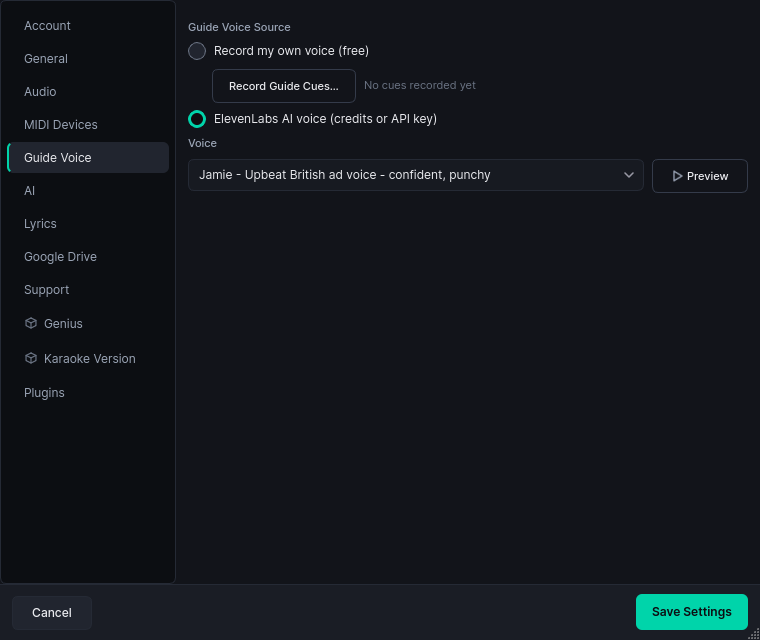
One credit is about one cent, a typical song runs 5 to 12 credits, and the app shows you the cost before anything charges. New accounts get 25 credits to play with. Prefer to run your own keys? One switch in Settings turns on bring-your-own-key and you pay us nothing. We are not precious about it.
Your whole rig, mirrored
Cloud keeps a complete copy of your TraxxTool world: the songs you have downloaded, your library, playlists, routing and settings. It is versioned, and restorable to any machine with one click. Laptop dies on a Thursday? Sign in on the spare, hit restore, and gig on Friday.
- A full mirror of your library and downloads
- Version history, so you can roll back a bad week
- One-click restore onto a brand-new machine
- API keys and logins never leave your computer
Free where it counts
Build everything for free, and pay once if you want whole-library exports.
Community Edition
free foreverThe full workbench, unlimited Song Share export, local stem splitting, and one merge to try.
Pro
$23.99 · one-timeFull Backup and unlimited merging into your existing Stage Traxx library. No subscription.
Cloud
$3.99/mo · $29.99/yrThe complete mirror above. Requires Pro, and you can cancel whenever.
Sound-check it yourself
Download it, throw your messiest multitrack at it, and see what comes out. If it saves you one late night, it has done its job. And it cost you nothing.